
Quick answer: Most LED display problems fall into a few groups: no image (power or signal), partial black blocks (receiving card, cable or power supply), flickering (loose connections, low refresh rate or config), dead pixels (LED or driver IC) and color differences (calibration or heat). Always check power and signal cables first — they cause the majority of on-site faults.
Many LED display issues are actually small system-level problems rather than major hardware failures.
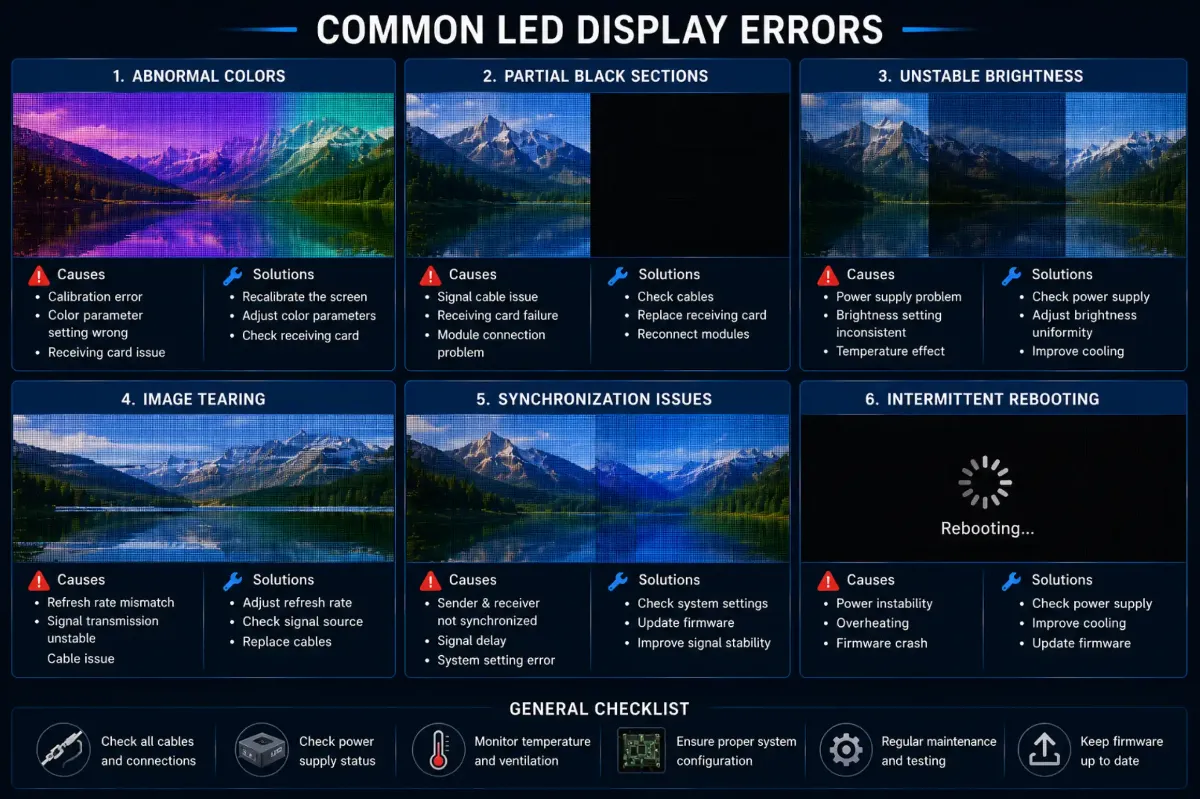
Common LED errors often include:
- необычные цвета
- partial black sections
- unstable brightness
- разрыв изображения
- synchronization issues
- intermittent rebooting
Why Systematic Troubleshooting Matters
Why Temporary Problems Are Difficult to Diagnose
Some issues appear only under certain conditions such as:
- высокая температура
- unstable electricity
- camera shooting
- heavy processing load
This is why long-term monitoring sometimes becomes necessary.
DDW Engineer Notes: Common LED display errors
Many LED system failures are not caused by one single component.
Modern LED displays are complex visual systems involving:
- power architecture
- signal processing
- thermal management
- software configuration
- structural stability
Professional troubleshooting should always analyze the entire system instead of focusing only on isolated hardware parts.
LED Display Troubleshooting Quick Reference
| Symptom | Likely Cause | What to Do |
|---|---|---|
| Whole screen black | No power or no signal | Check mains, breakers, sending card and source |
| One cabinet or block black | Receiving card, network cable or power supply | Swap cable, check card LEDs, test PSU |
| Flickering | Loose connector, low refresh, wrong config | Reseat cables, reload config, check refresh |
| Dead pixels or lines | LED or driver IC failure | Replace module or repair LEDs |
| Color blocks | Calibration data or mixed batches | Recalibrate, use same-batch spares |
FAQ
What is the most common LED screen problem?
Loose or damaged power and signal connections cause most on-site LED screen faults, followed by power supply and receiving card failures.
How do I troubleshoot an LED display quickly?
Work from the source forward: check video source and sending card, then network cables, receiving cards, power supplies and finally individual modules.
Can I repair an LED display myself?
Basic tasks like reseating cables, swapping modules or power supplies can be done by trained staff; component-level repairs are best left to the manufacturer.
Related LED Display Guides
- LED screen black screen fix
- LED screen flickering fix
- LED display dead pixels repair
- LED display signal loss troubleshooting
- LED screen power supply failure
- LED display repair cost and warranty
Recommended DDW products: KCOB Series COB LED video wall · FA Series outdoor LED screen