
Quick answer: Most LED display problems fall into a few groups: no image (power or signal), partial black blocks (receiving card, cable or power supply), flickering (loose connections, low refresh rate or config), dead pixels (LED or driver IC) and color differences (calibration or heat). Always check power and signal cables first — they cause the majority of on-site faults.
Nhiều sự cố liên quan đến màn hình LED thực chất chỉ là những vấn đề nhỏ ở cấp độ hệ thống, chứ không phải là những sự cố phần cứng nghiêm trọng.
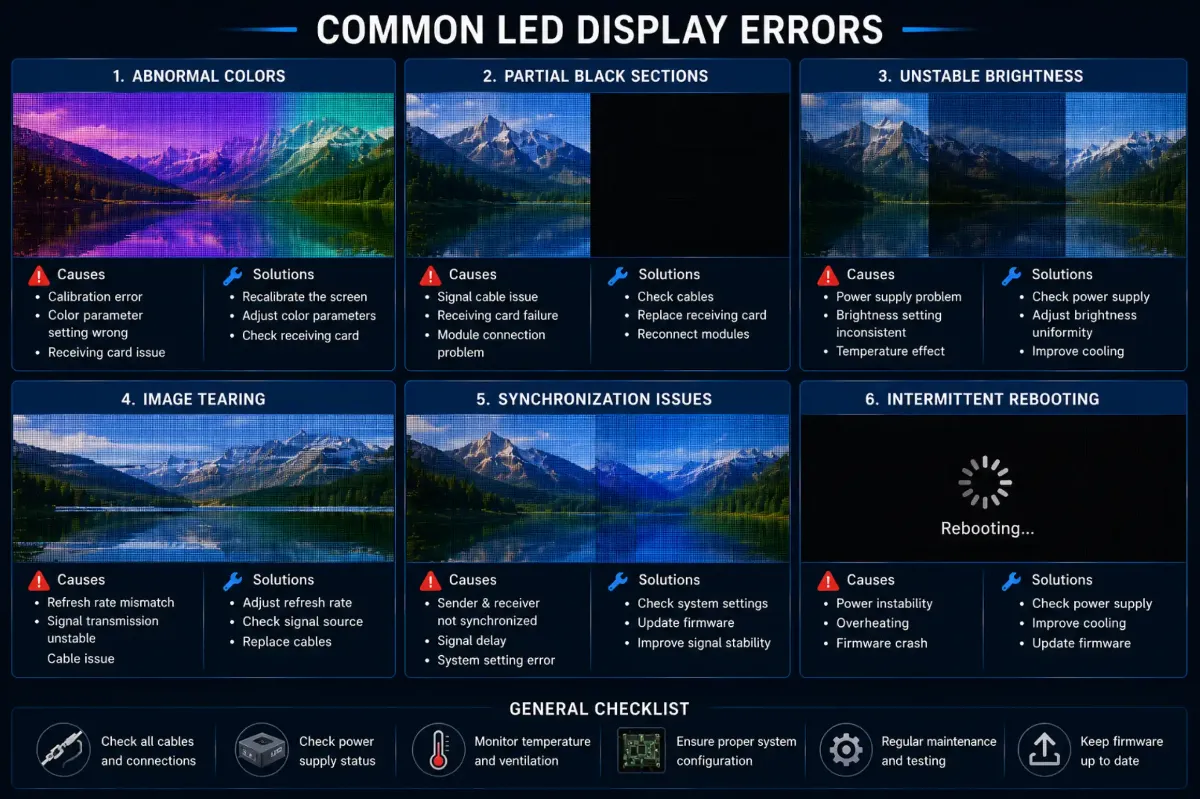
Các lỗi thường gặp ở đèn LED thường bao gồm:
- màu sắc bất thường
- các phần màu đen một phần
- độ sáng không ổn định
- hiện tượng rách hình
- các vấn đề về đồng bộ hóa
- tự khởi động lại không liên tục
Tại sao việc khắc phục sự cố có hệ thống lại quan trọng
Tại sao các vấn đề tạm thời lại khó chẩn đoán
Một số vấn đề chỉ xuất hiện trong một số điều kiện nhất định, chẳng hạn như:
- nhiệt độ cao
- nguồn điện không ổn định
- quay phim
- tải trọng xử lý lớn
Đó là lý do tại sao việc theo dõi lâu dài đôi khi trở nên cần thiết.
DDW Engineer Notes: Common LED display errors
Nhiều sự cố của hệ thống đèn LED không phải do một linh kiện duy nhất gây ra.
Các màn hình LED hiện đại là những hệ thống hiển thị phức tạp, bao gồm:
- kiến trúc nguồn
- xử lý tín hiệu
- quản lý nhiệt
- cấu hình phần mềm
- tính ổn định về mặt kết cấu
Việc khắc phục sự cố chuyên nghiệp luôn cần phân tích toàn bộ hệ thống thay vì chỉ tập trung vào các bộ phận phần cứng riêng lẻ.
LED Display Troubleshooting Quick Reference
| Symptom | Likely Cause | What to Do |
|---|---|---|
| Whole screen black | No power or no signal | Check mains, breakers, sending card and source |
| One cabinet or block black | Receiving card, network cable or power supply | Swap cable, check card LEDs, test PSU |
| Flickering | Loose connector, low refresh, wrong config | Reseat cables, reload config, check refresh |
| Dead pixels or lines | LED or driver IC failure | Replace module or repair LEDs |
| Color blocks | Calibration data or mixed batches | Recalibrate, use same-batch spares |
FAQ
What is the most common LED screen problem?
Loose or damaged power and signal connections cause most on-site LED screen faults, followed by power supply and receiving card failures.
How do I troubleshoot an LED display quickly?
Work from the source forward: check video source and sending card, then network cables, receiving cards, power supplies and finally individual modules.
Can I repair an LED display myself?
Basic tasks like reseating cables, swapping modules or power supplies can be done by trained staff; component-level repairs are best left to the manufacturer.
Related LED Display Guides
- LED screen black screen fix
- LED screen flickering fix
- LED display dead pixels repair
- LED display signal loss troubleshooting
- LED screen power supply failure
- LED display repair cost and warranty
Recommended DDW products: KCOB Series COB LED video wall · FA Series outdoor LED screen