
Quick answer: Calibration problems show up as uneven brightness, blotchy color or visible blocks, usually after long-term aging, mixing modules from different batches or losing calibration data in the receiving cards. The fix is to reload or redo point-by-point calibration and use same-batch spare modules.
Calibration problems usually become noticeable in:
- 高密度配置の会議室
- XRステージ
- コマンドセンター
- 高級小売店の店舗環境
視聴者がディスプレイのすぐ近くに立つ場合。.
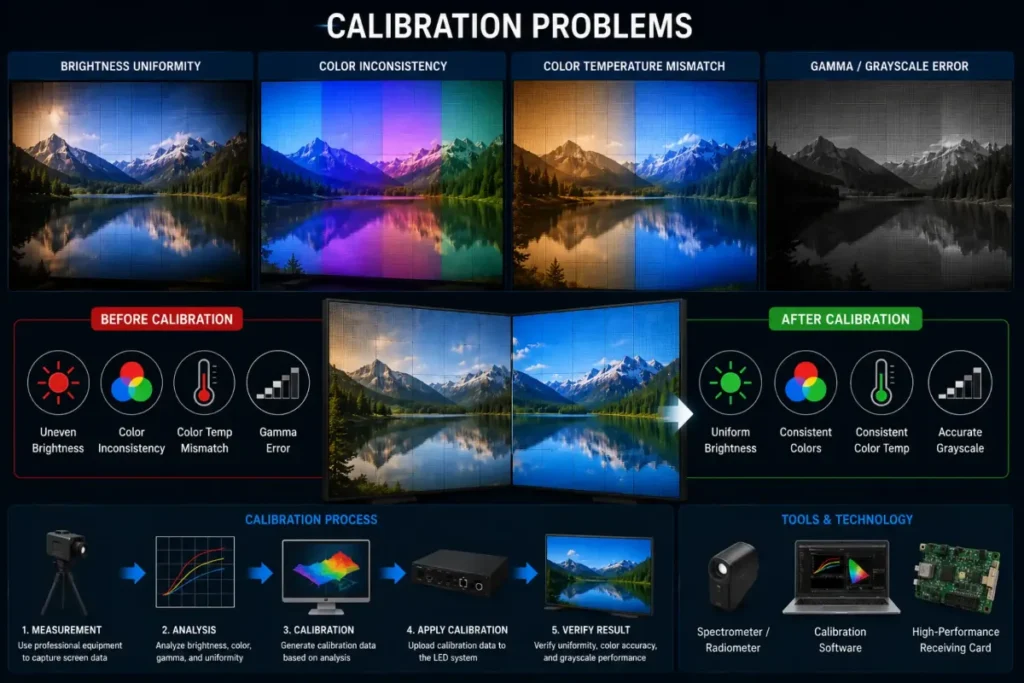
なぜ校正がそれほど重要なのか
適切なキャリブレーションを行わないと、LEDディスプレイには次のような表示が現れる可能性があります:
- 明るさのムラ
- グレースケールの不整合
- 色のバリエーション
- 目に見えるパッチ処理
これは、知覚される画質に直接影響を及ぼします。.
長期運用が校正に与える影響
Over time, LED modules naturally age differently.
これにより、徐々に次のような状況が生じる可能性があります:
- 輝度の変動
- カラーシフト
- 不均一なグレースケール
特に24時間365日稼働するシステムにおいては。.
DDW Engineer Notes: LED screen calibration problems
多くの高級LEDシステムは、ハードウェアの性能が低いからではなく、長期運用後にキャリブレーション管理が疎かになるために、依然として視覚的に不均一な状態になっている。.
適切な校正の維持管理は、平均的なプロジェクトと高品質な映像システムとの重要な違いの一つです。.
Calibration Problem Checklist
| Symptom | Likely Cause | What to Do |
|---|---|---|
| New module looks different | Different production batch | Use same-batch spares or recalibrate the module |
| Blocks after firmware update | Calibration coefficients lost | Reload calibration data to receiving cards |
| Gradual uneven color | LED aging over years | Redo point-by-point calibration |
| Edges brighter or darker | Seam or module brightness mismatch | Adjust seam brightness correction |
FAQ
Why does my LED screen have color blocks?
Usually because modules come from different batches, calibration data was lost, or LEDs have aged unevenly.
Can calibration fix old LED screens?
Yes, recalibration can significantly restore uniformity on aged LED screens, though at slightly lower overall brightness.
How do I restore lost calibration data?
Most control systems let you re-upload saved calibration files to the receiving cards; keep backups after every calibration.
Related LED Display Guides
- LED screen calibration explained
- LED display color difference fix
- How to replace an LED display module
- LED display daily maintenance checklist
Recommended DDW products: KCOB Series COB LED video wall · HK Series HD indoor LED screen