
Quick answer: To replace an LED display module, power off the section, remove the module from the front (magnetic or vacuum tool) or rear (screws/locks), disconnect its power and data cables, fit a same-batch spare, reconnect, then check brightness and color — recalibrating if the new module looks different.
LEDモジュールの交換は、長期的なメンテナンスにおいて通常行われる作業の一つです。.
ただし、不適切な交換手順を行うと、次のような問題が生じる可能性があります:
- 色の不統一
- 輝度の不一致
- calibration problems
- 位置合わせの問題
交換用モジュールの外観が異なることがある理由
仕様がまったく同じモジュールであっても、以下の理由により、わずかな違いが生じる場合があります:
- 生産ロット間のばらつき
- 校正誤差
- LEDの経年劣化
- 動作温度
これは、特にファインピッチの用途において顕著に表れます。.
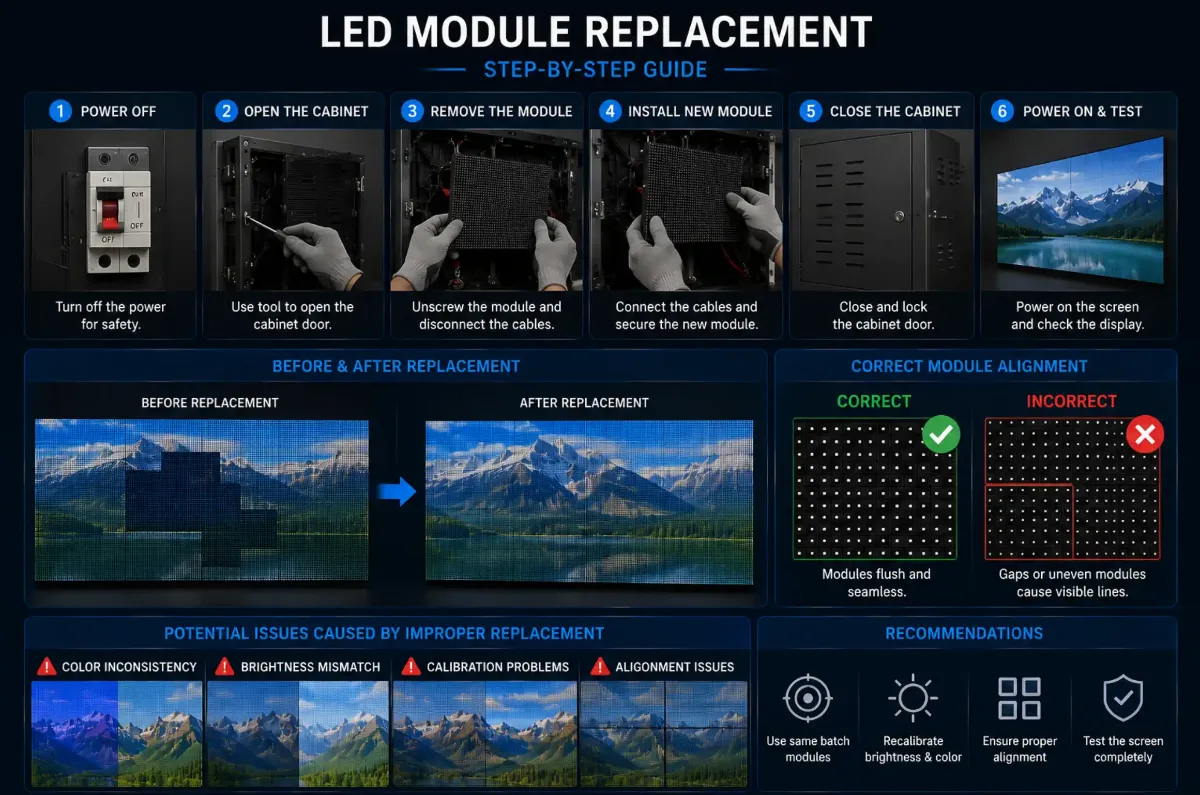
交換後に校正が重要な理由
専門的な交換手順には、通常、以下の内容が含まれます:
- 輝度補正
- 色補正
- グレースケール調整
再調整を行わないと、差し替えた部分が視覚的に不自然に見える可能性があります。.
DDW Engineer Notes: LED display module replacement
多くのお客様は、モジュールの交換とは単に機械的な取り替えに過ぎないと考えています。.
実際には、ハイエンドのファインピッチシステムでは、最高水準の視覚的な一貫性を維持するために、部品交換後に再調整が必要になることがよくあります。.
Module Replacement Steps
- Identify the faulty module and switch off its power section.
- Front service: use a magnetic or vacuum tool; rear service: unlock from behind.
- Disconnect the ribbon/data cable and power cable carefully.
- Install a spare from the same production batch, matching orientation.
- Reconnect, power on and check the image.
- Recalibrate or adjust if the module color differs.
FAQ
Can one LED module be replaced without removing the whole screen?
Yes. LED displays are modular; single modules can be replaced from the front or rear depending on the design.
Why does a new LED module look different?
It may come from a different LED batch or lack calibration data; use same-batch spares or recalibrate.
How many spare modules should I keep?
Typically 2–5% of the total module count, ordered together with the screen for batch consistency.
Related LED Display Guides
- LED screen calibration problems
- LED display dead pixels repair
- LED screen calibration explained
- LED display daily maintenance checklist
- LED display repair cost and warranty
Recommended DDW products: FU Series indoor LED display · Aシリーズ レンタル用LEDディスプレイ