
Quick answer: Refresh rate is how many times per second an LED screen redraws its image, measured in Hz. 1,920 Hz is enough for most advertising LED displays, while broadcast, rental and XR stages should use 3,840 Hz or higher to avoid flicker and scan lines on camera.
Why Some LED Screens Still Flicker on Camera
One of the most common questions in rental, XR, and broadcast projects is:
“Why does the screen still flicker even though the specification says 3840Hz?”
In reality, refresh rate is far more complicated than a single number shown on a quotation sheet.
Real camera performance is also affected by:
- LED display driver IC quality
- Scan mode
- Low grayscale processing
- Camera shutter speed
- Signal synchronization
- Processor configuration
This is why two LED screens with the same advertised refresh rate may perform completely differently during filming.
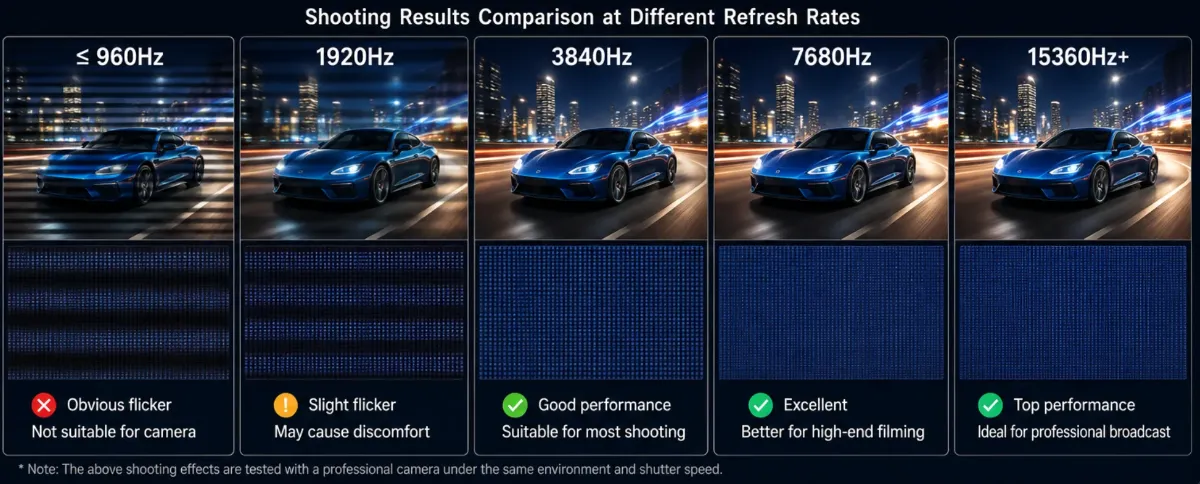
What Refresh Rate Actually Means
Refresh rate refers to how many times per second the display updates the image.
Measured in:
Hz
Examples:
- 1920Hz
- 3840Hz
- 7680Hz
Why Rental, XR, and Broadcast Projects Care About Refresh Rate
Smoother Visuals
High refresh rates reduce motion blur.
Better Camera Shooting
Essential for:
- Broadcast television
- XR virtual stages
- 영화 제작
- Live streaming events
- E-sports arenas
- High-speed camera shooting
Reduced Flicker
Improves visual comfort.
Recommended Refresh Rates
애플리케이션 | Recommended Refresh Rate |
회의실 | 1920Hz+ |
Rental Events | 3840Hz+ |
XR 스튜디오 | 7680Hz |
방송 | 7680Hz |
Refresh Rate vs Frame Rate
Refresh rate:
Display hardware performance.
Frame rate:
Video content playback speed.
Both influence image quality.
DDW Engineer Notes: LED Screen Refresh Rate
For normal conference room projects, 1920Hz is usually already acceptable.
However, in XR virtual production environments, especially when using high-speed cinema cameras, many studios now prefer:
- 7680Hz 주사율
- 저화질 그레이스케일 최적화
- 고성능 드라이버 IC 솔루션
Otherwise, scan lines and brightness instability may still appear on camera.
This is one of the biggest differences between normal rental LED projects and true virtual production systems.
FAQ
What refresh rate is good for an LED screen?
1,920 Hz is acceptable for general viewing; 3,840 Hz or higher is recommended for LED screens that will be filmed, broadcast or used in XR studios.
Why does an LED display flicker on camera?
Flicker and scan lines appear when the LED display refresh rate is too low compared with the camera shutter speed. A high-refresh driver IC fixes this.
Is refresh rate the same as frame rate?
No. Frame rate is how many new images the video source sends (e.g. 60 fps); refresh rate is how often the LED screen redraws each frame (e.g. 3,840 Hz).
Related LED Display Guides
- How LED display screens work
- LED display screen structure
- LED display brightness (nits)
- What is an LED display
- LED display pixel pitch explained
- LED screen flickering fix
Recommended DDW products: ORBIT XR Series XR LED wall · D Series rental LED screen