
Quick answer: A faulty or misconfigured receiving card usually makes one cabinet or area go black, show garbled images or wrong colors. Check the card’s indicator lights and network cables, reload the correct configuration file, update firmware if needed, and swap the card with a known good one to confirm.
کارتهای دریافت مسئول پردازش دادههای تصویری در داخل نمایشگرهای LED هستند.
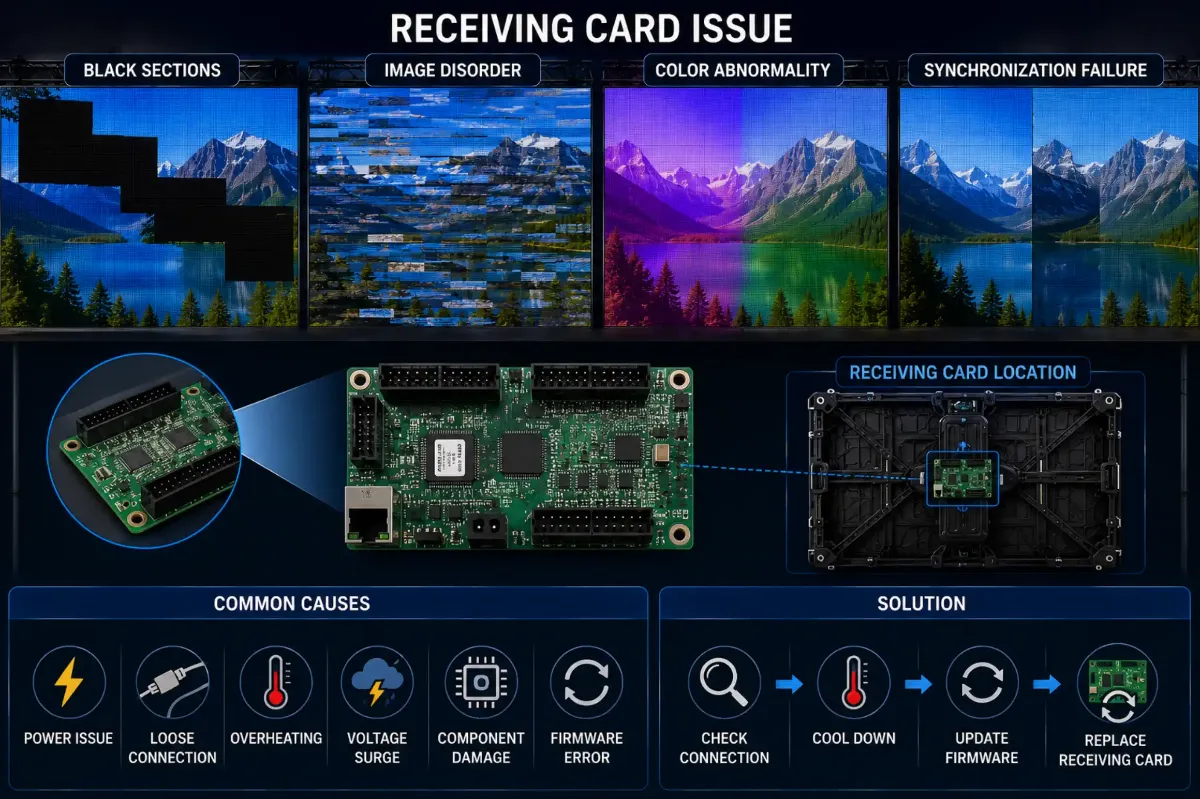
اگر دریافت کارتها ناموفق باشد، نمایش ممکن است با موارد زیر مواجه شود:
- بخشهای سیاه
- اختلال تصویر
- ناهنجاری رنگ
- شکست همگامسازی
چرا دریافت کارتها اینقدر مهم است
کارتهای گیرنده بهعنوان پل ارتباطی بین:
- سیستم کنترل
- پردازنده ویدئو
- ال ای دی modules
حتی ناپایداری جزئی میتواند بر سطوح نمایش بزرگ تأثیر بگذارد.
چرا پیکربندی نادرست باعث ایجاد مشکل میشود
مشکلات دریافت کارت همیشه ناشی از خرابی سختافزاری نیستند.
تنظیمات نادرست ممکن است همچنین باعث موارد زیر شود:
- مقیاس خاکستری غیرطبیعی
- پارگی تصویر
- خطاهای نقشهبرداری
- نوسازی ناسازگاری
این بهویژه در طول موارد زیر شایع است:
- ارتقاء سیستم
- بازآرایی اجاره
- تعویض پردازنده
DDW Engineer Notes: LED receiving card problems
بسیاری از تلاشها برای عیبیابی به دلیل اینکه تکنسینها بلافاصله سختافزار را بدون بررسی منطق پیکربندی تعویض میکنند، ناموفق میماند.
تشخیص حرفهای باید همیشه جدا کند:
- خرابی سختافزار
از - مسائل پیکربندی نرمافزار
Receiving Card Troubleshooting
| Symptom | Likely Cause | What to Do |
|---|---|---|
| One cabinet black | No signal to card or card failure | Check network cable and indicator lights; swap card |
| Garbled or shifted image | Wrong configuration file | Reload the correct config from the control software |
| Wrong colors in one area | Data line or config error | Check ribbon cables and RGB settings |
| Intermittent blackouts | Loose cable or unstable power | Reseat cables, check PSU output |
FAQ
What does a receiving card do in an LED display?
It receives video data from the sending card and distributes it to the LED modules in its cabinet.
How do I know if a receiving card is broken?
If swapping the network cable does not help and the card’s status light is off or abnormal, swap in a known good card to confirm.
Do I need to configure a new receiving card?
Yes. New cards must receive the same configuration and calibration data as the others.
Related LED Display Guides
- LED display signal loss troubleshooting
- LED screen black screen fix
- LED display signal connection guide
- Common LED display errors and fixes
- LED receiving card guide
Recommended DDW products: D Series rental LED screen · HK Series HD indoor LED screen