
Quick answer: A faulty or misconfigured receiving card usually makes one cabinet or area go black, show garbled images or wrong colors. Check the card’s indicator lights and network cables, reload the correct configuration file, update firmware if needed, and swap the card with a known good one to confirm.
Le schede di ricezione hanno il compito di elaborare i dati delle immagini all'interno dei display a LED.
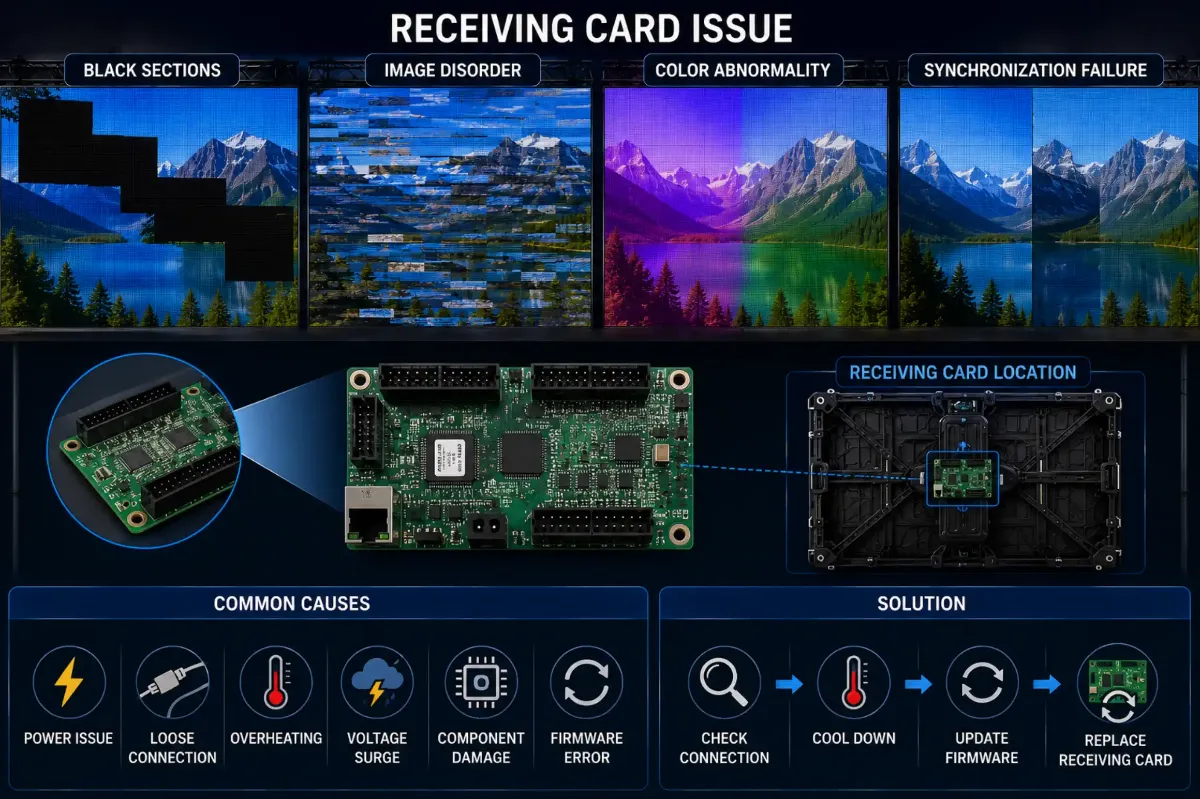
Se le schede di ricezione non funzionano correttamente, il display potrebbe presentare i seguenti problemi:
- sezioni nere
- disturbo dell'immagine
- anomalia cromatica
- errore di sincronizzazione
Perché i biglietti d'auguri sono così importanti
Le schede di ricezione fungono da ponte di comunicazione tra:
- sistema di controllo
- processore video
- LED modules
Anche una minima instabilità può influire su aree di visualizzazione di grandi dimensioni.
Perché una configurazione errata causa problemi
I problemi relativi alle schede di ricezione non sono sempre dovuti a guasti hardware.
Impostazioni errate possono inoltre causare:
- scala di grigi anomala
- distorsione dell'immagine
- errori di mappatura
- discrepanza nell'aggiornamento
Questo fenomeno è particolarmente comune durante:
- aggiornamenti del sistema
- riconfigurazione degli alloggi in affitto
- sostituzione del processore
DDW Engineer Notes: LED receiving card problems
Molti tentativi di risoluzione dei problemi falliscono perché i tecnici sostituiscono immediatamente i componenti hardware senza prima verificare la logica di configurazione.
Una diagnosi professionale dovrebbe sempre distinguere tra:
- guasto hardware
da - problemi di configurazione del software
Receiving Card Troubleshooting
| Symptom | Likely Cause | What to Do |
|---|---|---|
| One cabinet black | No signal to card or card failure | Check network cable and indicator lights; swap card |
| Garbled or shifted image | Wrong configuration file | Reload the correct config from the control software |
| Wrong colors in one area | Data line or config error | Check ribbon cables and RGB settings |
| Intermittent blackouts | Loose cable or unstable power | Reseat cables, check PSU output |
FAQ
What does a receiving card do in an LED display?
It receives video data from the sending card and distributes it to the LED modules in its cabinet.
How do I know if a receiving card is broken?
If swapping the network cable does not help and the card’s status light is off or abnormal, swap in a known good card to confirm.
Do I need to configure a new receiving card?
Yes. New cards must receive the same configuration and calibration data as the others.
Related LED Display Guides
- LED display signal loss troubleshooting
- LED screen black screen fix
- LED display signal connection guide
- Common LED display errors and fixes
- LED receiving card guide
Recommended DDW products: D Series rental LED screen · HK Series HD indoor LED screen