
Quick answer: A faulty or misconfigured receiving card usually makes one cabinet or area go black, show garbled images or wrong colors. Check the card’s indicator lights and network cables, reload the correct configuration file, update firmware if needed, and swap the card with a known good one to confirm.
Receiving cards are responsible for processing image data inside LED displays.
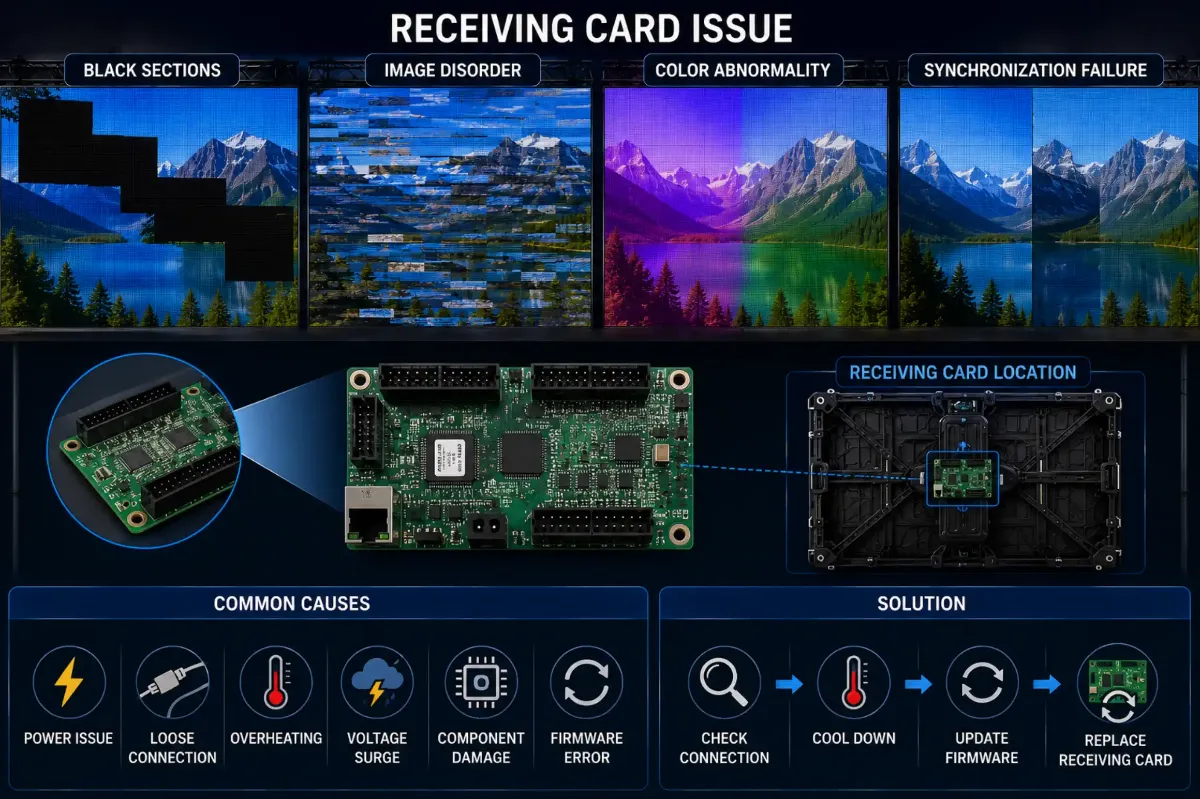
If receiving cards fail, the display may experience:
- secciones negras
- image disorder
- color abnormality
- fallo de sincronización
Why Receiving Cards Are So Important
Receiving cards act as the communication bridge between:
- control system
- video processor
- LED modules
Even minor instability may affect large display areas.
Why Improper Configuration Creates Problems
Receiving card issues are not always hardware failures.
Incorrect settings may also cause:
- abnormal grayscale
- distorsión de la imagen
- mapping errors
- refresh mismatch
This is especially common during:
- system upgrades
- rental reconfiguration
- processor replacement
DDW Engineer Notes: LED receiving card problems
Many troubleshooting attempts fail because technicians immediately replace hardware without first checking configuration logic.
Professional diagnosis should always separate:
- hardware failure
from - software configuration issues
Receiving Card Troubleshooting
| Symptom | Likely Cause | What to Do |
|---|---|---|
| One cabinet black | No signal to card or card failure | Check network cable and indicator lights; swap card |
| Garbled or shifted image | Wrong configuration file | Reload the correct config from the control software |
| Wrong colors in one area | Data line or config error | Check ribbon cables and RGB settings |
| Intermittent blackouts | Loose cable or unstable power | Reseat cables, check PSU output |
FAQ
What does a receiving card do in an LED display?
It receives video data from the sending card and distributes it to the LED modules in its cabinet.
How do I know if a receiving card is broken?
If swapping the network cable does not help and the card’s status light is off or abnormal, swap in a known good card to confirm.
Do I need to configure a new receiving card?
Yes. New cards must receive the same configuration and calibration data as the others.
Related LED Display Guides
- LED display signal loss troubleshooting
- LED screen black screen fix
- LED display signal connection guide
- Common LED display errors and fixes
- LED receiving card guide
Recommended DDW products: D Series rental LED screen · HK Series HD indoor LED screen