
Quick answer: Dead pixels on LED displays are LEDs that stay off, stay on or show the wrong color. They are caused by physical impact, moisture, heat, poor soldering or driver IC faults. Single pixels can be repaired or the module replaced; COB and GOB technologies greatly reduce dead pixels in rental and fine-pitch screens.
تعد البكسلات الميتة من أكثر المشكلات شيوعًا في مشاريع شاشات LED، لا سيما في:
- قاعات اجتماعات ذات تباعد ضيق بين المقاعد
- الإنتاج الافتراضي الممتد الواقعي
- استوديوهات البث
- بيئات البيع بالتجزئة الفاخرة
- مراكز القيادة
في تطبيقات المشاهدة عن قرب، قد يصبح حتى عدد قليل من البكسلات الميتة ملحوظًا بالعين المجردة.
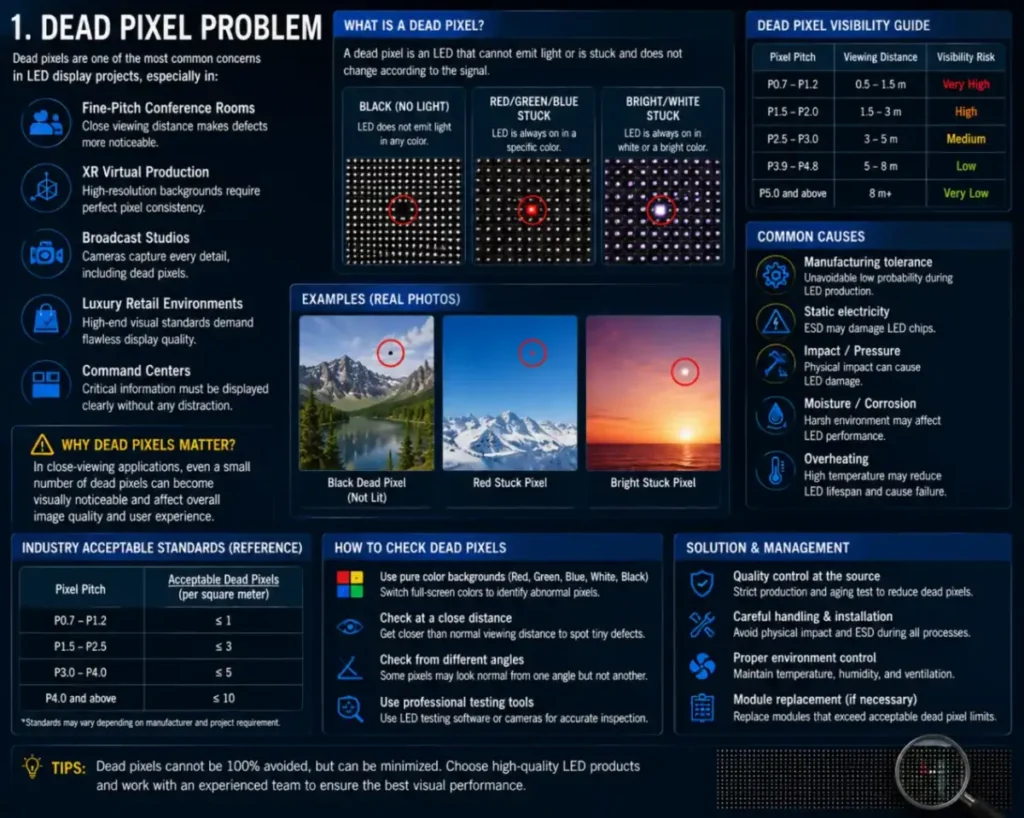
ما الذي يتسبب فعليًّا في ظهور النقاط الميتة؟
يعتقد العديد من العملاء أن البكسلات الميتة تنتج فقط عن عيوب في مصابيح LED.
في الواقع، قد تنشأ مشاكل البكسلات الميتة عن:
- تعطل مصباح LED
- مشكلات في دارة التحكم في السائق
- عدم استقرار اللحام
- الأضرار الناتجة عن الصدمات
- moisture corrosion
- ارتفاع درجة الحرارة
- اهتزازات وسائل النقل
This is why the root cause should always be analyzed before replacing modules.
لماذا غالبًا ما تعاني مشاريع الشاشات المستأجرة من عدد أكبر من البكسلات الميتة
تواجه أنظمة LED المؤجرة باستمرار ما يلي:
- النقل
- الاهتزاز
- التثبيت المتكرر
- مخاطر التصادم
وهذا يؤدي إلى إجهاد مادي أكبر بكثير مقارنة بالمنشآت الثابتة.
ولهذا السبب، تتزايد استخدام أنظمة التأجير لما يلي:
- حماية GOB
- الوحدات المقواة
- تصميم خزانة مضادة للتصادم
DDW Engineer Notes: LED display dead pixels
لا ترجع أسباب العديد من مشكلات البكسلات الميتة إلى عيوب في التصنيع.
غالبًا ما يكون النقل غير السليم، وارتفاع درجة الحرارة، والتعرض للرطوبة، وممارسات التركيب غير السليمة هي الأسباب الحقيقية وراء أعطال وحدات البكسل على المدى الطويل.
في المشاريع الراقية، عادةً ما تكون الصيانة الوقائية أكثر فعالية من الإصلاحات الطارئة المتكررة.
Dead Pixel Types and Fixes
| Symptom | Likely Cause | What to Do |
|---|---|---|
| Single dark pixel | LED damaged by impact or moisture | Repair LED or replace module |
| Whole row or column dark | Driver IC or data line fault | Replace module |
| Pixel always on | Short circuit | Replace LED or module |
| Many dead pixels after storage | Moisture | Preheat gradually; improve storage |
FAQ
How many dead pixels are acceptable on an LED display?
Industry standards typically allow a very small rate (often around 1 in 10,000 or less), but quality screens aim for zero visible dead pixels.
Can dead pixels on an LED screen be repaired?
Yes. Technicians can replace individual LEDs on SMD modules or swap the whole module.
How do I prevent dead pixels?
Handle modules carefully, control humidity, preheat after storage and consider COB or GOB for high-risk applications.
Related LED Display Guides
- How to replace an LED display module
- LED display moisture protection
- COB LED display technology
- Common LED display errors and fixes
- LED display repair cost and warranty
Recommended DDW products: KCOB Series COB LED video wall · ORBIT XR Series XR LED wall