
Quick answer: LED screen calibration measures the brightness and color of every pixel (point-by-point) with a professional camera, then stores correction coefficients in the receiving cards. It removes blotchy or uneven areas, matches new replacement modules to old ones, and should be done at the factory and repeated after major module replacement.
معايرة مصابيح LED
حتى وحدات LED عالية الجودة قد تظهر اختلافات طفيفة في:
- السطوع
- درجة حرارة اللون
- التدرج الرمادي
- الاتساق البصري
تساعد تقنية المعايرة في تصحيح هذه الاختلافات.
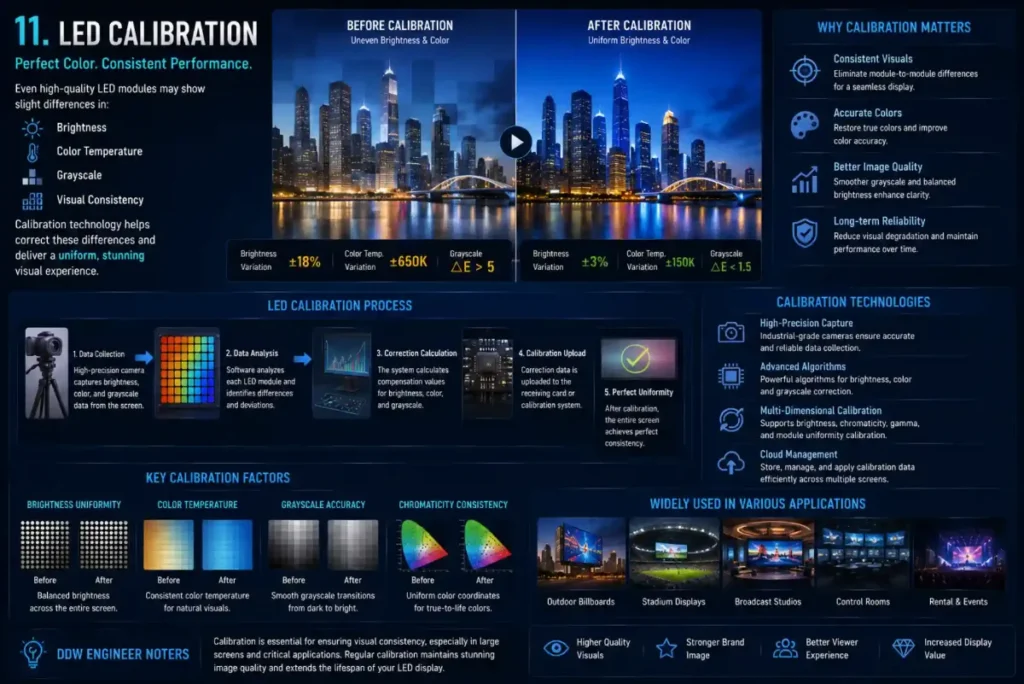
لماذا تُعد المعايرة أمرًا بالغ الأهمية في شاشات العرض ذات المسافات الدقيقة بين النقاط
مع انخفاض مسافة البكسل، تصبح حتى أوجه التباين الطفيفة أكثر وضوحًا.
وينطبق هذا بشكل خاص على:
- استوديوهات إكسبيرينس ريتي
- بيئات البث
- مراكز القيادة
- أنظمة التصور الفاخرة
تساعد المعايرة في الحفاظ على:
- صور أكثر سلاسة
- توحيد اللون
- اتساق التدرج الرمادي
When to Calibrate an LED Display
- At the factory before shipping.
- After replacing modules from a different batch.
- When color blocks or uneven brightness become visible.
- For broadcast, XR and control rooms, as part of periodic maintenance.
DDW Engineer Notes: LED screen calibration
يقلل العديد من العملاء من أهمية المعايرة.
في الواقع، غالبًا ما تؤثر جودة المعايرة بشكل مباشر على مظهر الشاشة:
- متميز
أو - الطبقة الدنيا
خاصة في تطبيقات المشاهدة عن قرب.
FAQ
What is point-by-point calibration?
It measures each LED pixel with a camera and adjusts its brightness and color so the whole LED display looks uniform.
How often should an LED screen be calibrated?
Typically at the factory and after major repairs; high-end installations may recalibrate every 1–2 years.
Can calibration fix all color differences?
It fixes most brightness and color variations, but cannot fully compensate for physically damaged or very different LED batches.
Related LED Display Guides
- HDR LED display color performance
- COB LED display technology
- SMD vs DIP LED screen
- LED screen calibration problems
Recommended DDW products: KCOB Series COB LED video wall · HK Series HD indoor LED screen