
Quick answer: LED display brightness is measured in nits (cd/m²). Indoor LED screens usually need 600–1,500 nits, semi-outdoor 2,500–4,000 nits, and outdoor LED displays in direct sunlight 5,000–8,000 nits or more.
मूल समझ
चमक यह निर्धारित करती है कि विभिन्न प्रकाश परिस्थितियों में एक एलईडी डिस्प्ले कितना दिखाई देता है।.
यह के लिए सबसे महत्वपूर्ण विनिर्देशों में से एक है। indoor and outdoor LED display applications.
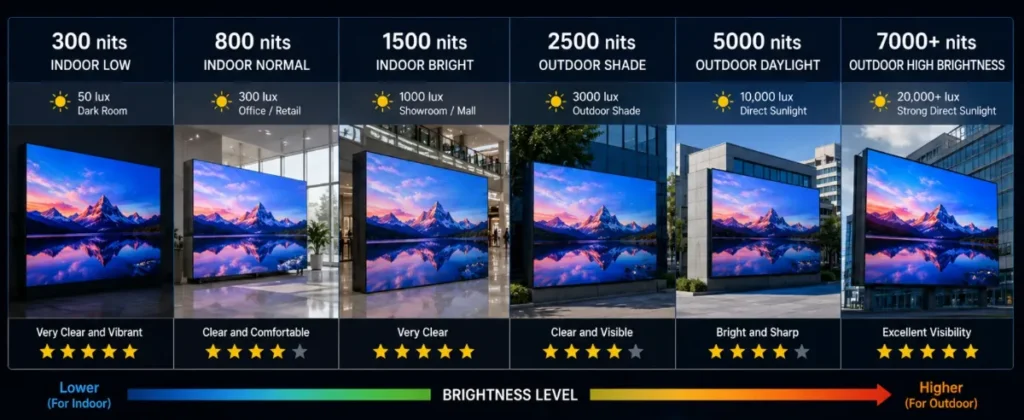
ब्राइटनेस क्या है?
चमक को मापा जाता है:
निट्स (सीडी/मीटर वर्ग)
उच्च चमक का अर्थ है बेहतर दृश्यता।.
आम चमक स्तर
आवेदन | चमक |
अंदरूनी सम्मेलन | 600–1000 निट्स |
खुदरा प्रदर्शन | 800–1500 निट्स |
बाहरी विज्ञापन | 5000–10000 निट्स |
स्टेडियम प्रदर्शन | 6500–10000 निट्स |
चमक संबंधी समस्याएं जिन्हें अधिकांश ग्राहक अनदेखा करते हैं
अंदरूनी अनुप्रयोग
अत्यधिक चमक से आँखों में थकान हो सकती है।.
बाहरी अनुप्रयोग
प्रदर्शन सीधी धूप में भी दिखाई देने चाहिए।.
स्वचालित चमक समायोजन
आधुनिक एलईडी सिस्टम परिवेशीय प्रकाश के आधार पर स्वचालित चमक नियंत्रण का समर्थन करते हैं।.
लाभ:
- ऊर्जा की बचत
- बेहतर दृश्य आराम
- लंबी आयु
DDW Technical Insight: LED Display Brightness
सही चमक स्तर चुनने से देखने की गुणवत्ता, ऊर्जा दक्षता और दीर्घकालिक प्रदर्शन में सुधार होता है।.
FAQ
How many nits does an outdoor LED display need?
Outdoor LED displays generally need 5,000–8,000 nits to stay readable in direct sunlight; shaded or north-facing sites can use about 4,000–5,000 nits.
Can an indoor LED screen be too bright?
Yes. Indoor LED screens above about 1,500 nits cause glare and eye fatigue, so they are normally dimmed to 400–800 nits in use.
What is automatic brightness adjustment?
A light sensor measures ambient light and the control system raises or lowers LED display brightness automatically, saving energy and extending LED life.
Related LED Display Guides
- Indoor vs outdoor LED display
- LED screen IP rating
- LED display screen structure
- LED screen refresh rate
- LED display pixel pitch explained
- Energy-saving LED display technology
Recommended DDW products: FC Series energy-saving outdoor LED screen · HK Series HD indoor LED screen