
Quick answer: LED display brightness is measured in nits (cd/m²). Indoor LED screens usually need 600–1,500 nits, semi-outdoor 2,500–4,000 nits, and outdoor LED displays in direct sunlight 5,000–8,000 nits or more.
Core Understanding
Brightness determines how visible an LED display remains under different lighting conditions.
It is one of the most critical specifications for indoor and outdoor LED display applications.
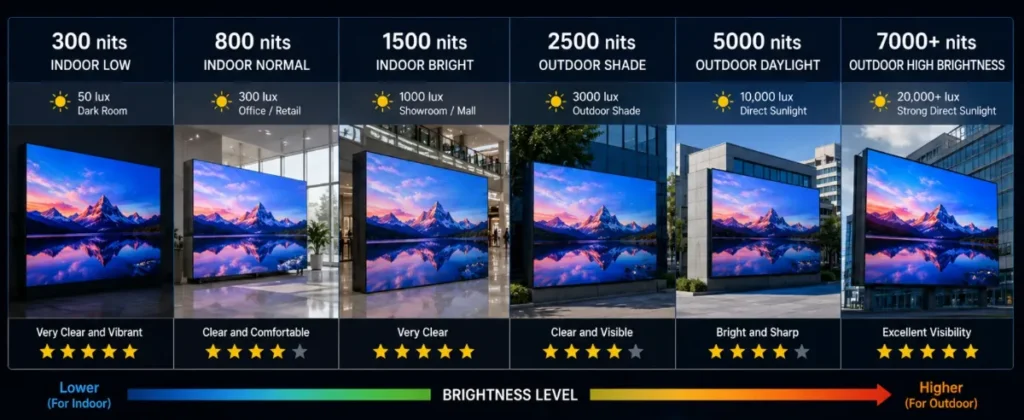
What is Brightness?
Brightness is measured in:
Nits (cd/m²)
Higher brightness means stronger visibility.
Typical Brightness Levels
Application | Brightness |
Indoor Conference | 600–1000 nits |
Retail Display | 800–1500 nits |
Outdoor Advertising | 5000–10000 nits |
Stadium Display | 6500–10000 nits |
Brightness Problems Most Customers Ignore
Indoor Applications
Too much brightness may cause eye fatigue.
Outdoor Applications
Displays must remain visible under direct sunlight.
Automatic Brightness Adjustment
Modern LED systems support automatic brightness control based on ambient light.
Benefits:
- Energy saving
- Better visual comfort
- Longer lifespan
DDW Technical Insight: LED Display Brightness
Choosing the correct brightness level improves viewing quality, energy efficiency, and long-term display performance.
FAQ
How many nits does an outdoor LED display need?
Outdoor LED displays generally need 5,000–8,000 nits to stay readable in direct sunlight; shaded or north-facing sites can use about 4,000–5,000 nits.
Can an indoor LED screen be too bright?
Yes. Indoor LED screens above about 1,500 nits cause glare and eye fatigue, so they are normally dimmed to 400–800 nits in use.
What is automatic brightness adjustment?
A light sensor measures ambient light and the control system raises or lowers LED display brightness automatically, saving energy and extending LED life.
Related LED Display Guides
- Indoor vs outdoor LED display
- LED screen IP rating
- LED display screen structure
- LED screen refresh rate
- LED display pixel pitch explained
- Energy-saving LED display technology
Recommended DDW products: FC Series energy-saving outdoor LED screen · HK Series HD indoor LED screen