
Quick answer: An LED display signal chain runs from the video source (HDMI, DVI or SDI) to a video processor or sending card, then over Cat6 or fiber to receiving cards in each cabinet. A 1 Gbps port drives about 650,000 pixels, Cat6 works up to roughly 100 m, and fiber is used for longer runs. Backup loops keep the screen running if a cable fails.
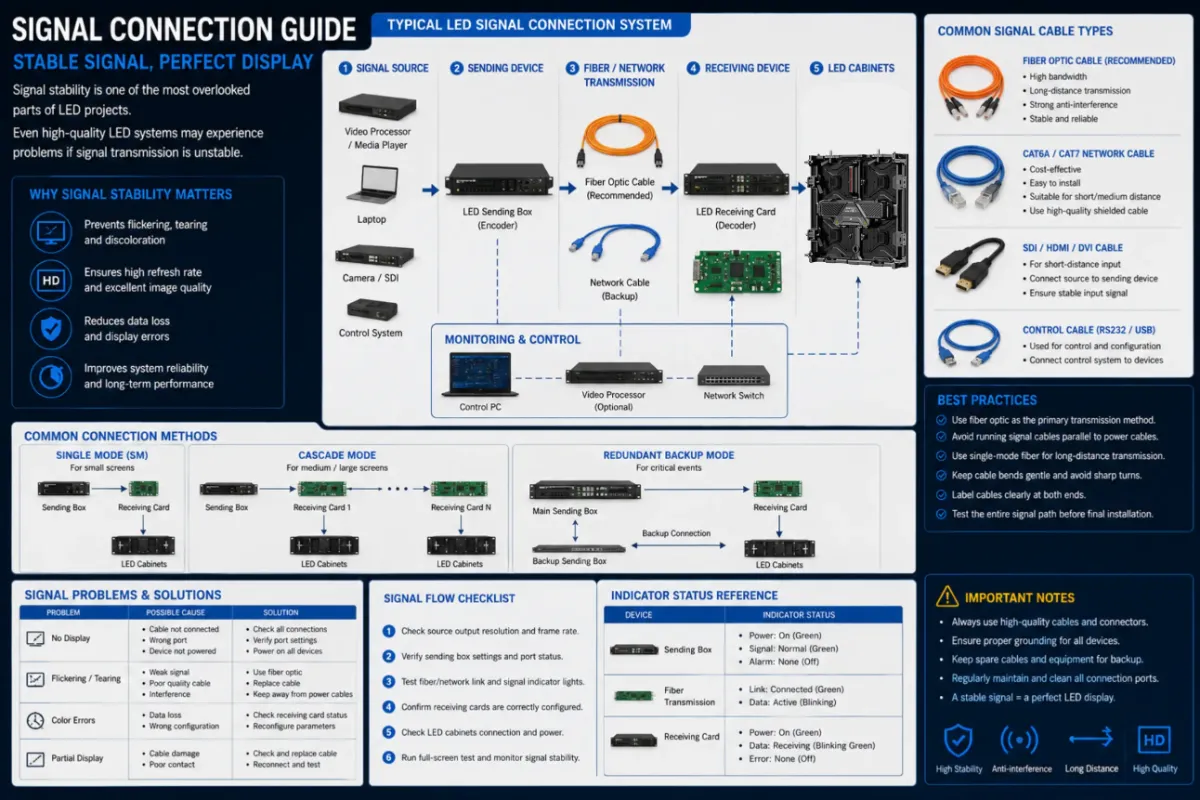
Signal stability is one of the most overlooked parts of LED projects.
Even high-quality LED systems may experience problems if signal transmission is unstable.
Why Signal Stability Matters
Poor signal systems may cause:
- flickering
- black screens
- image tearing
- synchronization failure
This becomes especially critical in:
- XR production
- broadcast environments
- live concerts
- command centers
Why Cable Management Is Important
Professional LED installations usually prioritize:
- organized signal routing
- backup signal paths
- interference reduction
- maintenance accessibility
Messy signal systems often increase troubleshooting difficulty significantly.
DDW Engineer Notes: LED display signal connection
In many large-scale rental projects, unstable signal connection is one of the most common causes of temporary display failure.
Professional cable management is often underestimated until problems appear during live operation.
Signal Connection Best Practices
- Stay within each port’s pixel capacity and plan cabling in a simple snake pattern.
- Use shielded Cat6 for runs under about 100 m; use fiber converters beyond that.
- Add a backup (redundant) loop from the last cabinet back to the processor.
- Label all ports and cables for fast troubleshooting.
- Keep signal cables away from power cables to reduce interference.
FAQ
How many pixels can one sending card port drive?
A standard 1 Gbps Ethernet port drives about 650,000 pixels at 60 Hz, depending on the control system and bit depth.
How long can an LED screen network cable be?
Cat5e/Cat6 is reliable up to about 100 m. For longer distances, use fiber optic converters or fiber-enabled processors.
What is a backup loop on an LED display?
It is a second cable path that returns from the last receiving card to the processor, so the screen keeps working if one cable breaks.
Related LED Display Guides
- LED screen power distribution guide
- LED display daily maintenance checklist
- Hanging LED screen installation
- Ground support LED screen installation
- LED display signal loss troubleshooting
- LED sending card guide
- LED video processor guide
Recommended DDW products: D Series rental LED screen · HK Series HD indoor LED screen